
PayByPlateMA Account
Pay By Plate MA Account is a registered account service that helps drivers view account activity, manage plate details, and handle invoices for travel on Massachusetts toll roads. On this page, you’ll learn what each account option means, what information is needed, and how to complete the most common actions without confusion.
What is PayByPlateMA Account?
A PayByPlateMA account is used to manage toll activity tied to your license plate on Massachusetts toll roads. Through a registered account, users can:
➤ View account status and basic account details.
➤ Add or review vehicle and plate information.
➤ Track invoices and posted toll charges.
➤ Pay balances and keep payment history for records.
➤ Maintain account contacts for billing and notices.
A registered account can be set up as Prepaid (funded balance) or Postpaid (billed after tolls post), depending on how you prefer to pay.
How to Login to a Registered Account
Use the registered account login to access your account information. Before signing in, choose the login type shown on the page, then enter the required credentials.
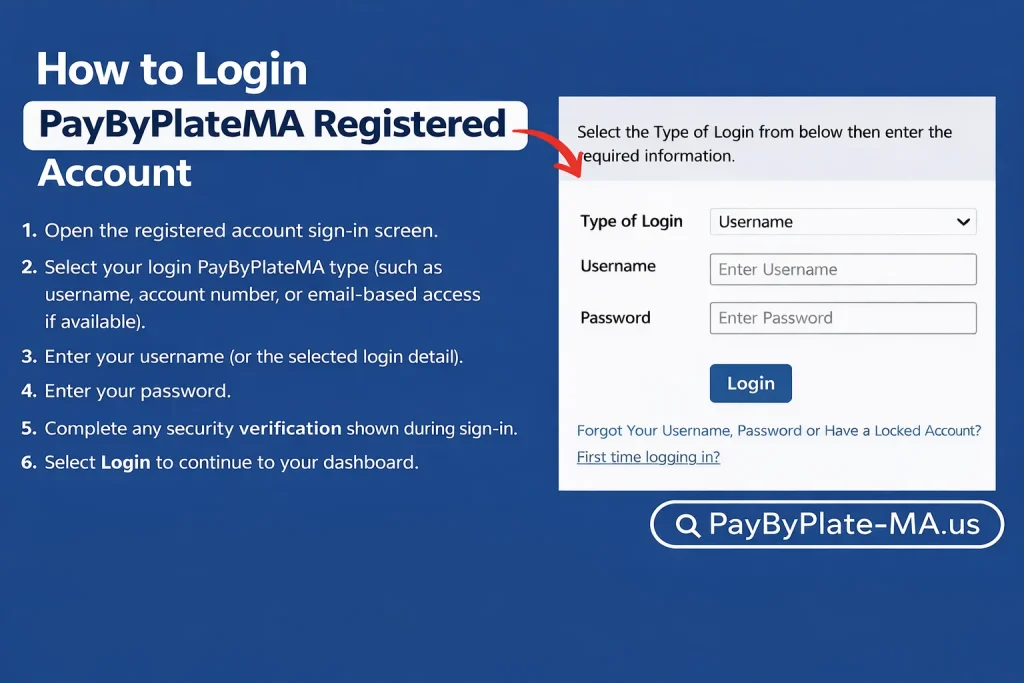
Login steps
- Open the registered account sign-in screen.
- Select your login PayByPlateMA type (such as username, account number, or email-based access if available).
- Enter your username (or the selected login detail).
- Enter your password.
- Complete any security verification shown during sign-in.
- Select Login to continue to your dashboard.
If you forgot your username or password
- Use account recovery with:
- Account Number
- Email address listed on your account
- Follow the recovery steps and check your email for next instructions.
- If no email is listed on your account, contact EZDriveMA customer service.
First-time login
First-time users complete initial setup using:
👍 Account Number
👍 PIN
👍 New Username
👍 New Password (and confirmation)
Open a Registered Prepaid Account
A Registered Prepaid Account is designed for drivers who prefer to keep a balance available and have toll charges deducted as they are posted.
When signing up, you may need
- License plate number(s) (as listed on registration)
- Vehicle details (make, model, year)
- Payment information (card or bank details for replenishment options)
Account Contacts (Step 2 of 6)
During setup, you can add one or more contacts. The first contact added is treated as the Primary Contact and receives account correspondence related to account activity and status.
Pay a Pay By Plate MA Invoice
Pay By Plate MA invoices can be paid using the details printed on your invoice. You may be asked to provide information such as an invoice number, plate number, and plate state.
What you need
- Invoice number (from your mailed invoice)
- License plate number
- Plate state (as shown on the invoice)
Payment notes
- If paying by check or money order, follow the payment instructions provided on your invoice.
- If an RMV/DMV non-renewal hold is involved, balances typically must be paid in full before release processing begins.
- Processing timelines vary depending on account status and notice stage.
Forms and Applications
Use forms for common account actions such as updates, payment option changes, appeals, hearings, or account closure requests. Download the required document, complete it, and submit it using the provided delivery method.
Submission (mail or fax)
EZDriveMA Customer Service Center
27 Midstate Drive
Auburn, MA 01501-1800
Fax: (508) 786-5222
Common documents
➡️ Account update request
➡️ Payment option change request
➡️ Close account request
➡️ Appeal request
➡️ Hearing request
➡️ Lease/rental reassignment form (for eligible companies)
➡️ Registered account application
➡️ Terms and conditions reference
Fee Schedule
Fees may apply based on invoice delivery method, statement delivery method, and unpaid invoice notice stage. Online access is typically available without a mailing charge, while mailed and special requests may include a fee.
Unpaid invoice notice stages
- Invoice issued (initial due window)
- Past due invoice (late fees may apply to overdue toll charges)
- Notice of non-payment (additional late fees may apply)
- Notice of liability (may include additional fees and RMV/DMV-related actions)
Important
- If a non-renewal hold exists, balances must be paid in full to process RMV/DMV releases.
- Fee amounts and processing times may change.
Common Issues & Fixes
Like most account portals, Pay By Plate MA can sometimes be slow to load or show temporary access issues. Here are the most common problems users face and what usually helps.
Page Not Loading / Blank Screen
Refresh the page and try again. Clear browser cache and cookies, then retry using Chrome or Edge. If the issue continues, sign out fully and open the page in a new window.
Login Problems
Confirm you selected the correct login type and entered the matching credentials. If you forgot your details, use the account recovery option with your account number and the email address on file.
Locked Account / Reset Not Working
If your account is locked or recovery does not complete, verify the email address listed on your account. If you do not have an email on file, customer service support may be required for access restoration.
Invoice Not Found / Payment Not Going Through
Enter the invoice number and license plate exactly as shown on the notice, including the plate state. If the invoice was recently issued, allow time for it to appear before trying again.
RMV/DMV Hold Release Delay
If a non-renewal hold is involved, balances must be paid in full. RMV/DMV release updates may take additional business days depending on account status and notice stage.
System Down Time
It rarely happens, but it is possible. If the portal isn’t loading or your access issue continues, contact EZDriveMA Customer Service at (877) 627-7745 for assistance.
FAQs – Frequently Asked Questions
What do I need for first-time login?
Account number and PIN, plus a new username and password.
I can’t log in—what should I do?
Use account recovery with your account number and the email listed on your account.
What’s the difference between prepaid and postpaid accounts?
Prepaid uses a balance; postpaid is billed after tolls are processed.
How do I pay an invoice correctly?
Use the invoice number and plate details exactly as shown on the invoice.
Robin Tearaia has 17+ years of experience writing about digital toll payment systems across the US. She has personally used PayByPlateMA and EZDriveMA extensively and is dedicated to helping drivers navigate electronic tolling with accurate, current information.
Question not covered here? Drop a comment — happy to help.
Disclaimer: This site is for educational and informational purposes. Not affiliated with, endorsed by, or sponsored by EZDriveMA or the Commonwealth of Massachusetts. For official services: www.ezdrivema.com.